AI + ERPNext Integration Platform
Frappe Assistant Core: The AI Execution Layer for ERPNext
A flagship Techunison-style single-page website section for Frappe Assistant Core — the MCP-based platform that connects ERPNext to Claude, GPT, custom enterprise agents, and future AI systems through secure, standardized tools and protocols.
LLM-Agnostic
MCP / JSON-RPC 2.0
OAuth 2.0 / OIDC
21 Built-In Tools
Plugin Architecture
AGPL-3.0
This is not just an ERP chatbot. It is a governed execution layer that lets AI models reason, authenticate, and act on ERPNext through enterprise-grade controls
Integration Model
MCP Native
Expose ERPNext functionality to any compatible LLM through a standardized tool protocol.
Security Model
OAuth + RBAC
Authentication, ERPNext permissions integration, audit trails, and role-based access control.
Deployment Experience
FAC Admin
Admin interface for endpoint discovery, plugin enablement, and operational visibility.
Extensibility
Plugin Framework
Core plugin, data science, visualization, external app integrations, and custom business logic.
01
The challenge
LLMs can reason in natural language, but enterprise systems are still trapped behind brittle APIs and one-off integrations.
02
The opportunity
Business teams want AI that can do real work: create documents, search records, run reports, and follow permissions.
03
The blocker
Without a standard protocol, every model integration creates lock-in, rebuild effort, and governance risk.
04
The answer
Frappe Assistant Core uses MCP to expose ERPNext capabilities once and reuse them across AI clients.
Platform Positioning
From System of Record to System of Intelligent Execution
Frappe Assistant Core sits between the AI layer and ERPNext, turning ERP operations into governed tools that language models can invoke safely. Instead of building separate adapters for each model vendor, organizations gain one standardized interface that can serve Claude Desktop, ChatGPT connectors, Claude Web, MCP Inspector, internal copilots, and future AI clients.
This is why the product matters strategically: it is not another assistant widget. It is the foundation for AI-powered ERP operations, department-specific agents, workflow automation, and model-agnostic enterprise intelligence.
Why this matters to Techunison
AI-first platform story: positions Techunison as an infrastructure builder, not just an implementer.
No vendor lock-in: the ERP-to-AI bridge survives model changes.
Enterprise extensibility: plugin architecture fits healthcare, manufacturing, supply chain, and finance.
Operational trust: governed access, authentication, and auditability are built into the core.
Interactive Architecture
Clickable Layer-by-Layer System Design
LLM Layer
Claude Desktop
One-click connector path through DXT generation
GPT / Custom LLM
Model-agnostic access through MCP-compatible clients
Future LLMs
Reuse the same interface across emerging AI systems
Integration Layer
MCP Protocol
JSON-RPC 2.0 based tool exposure for AI clients
DXT Generator
Fast-path setup for Claude Desktop integration
HTTP / STDIO Bridge
Multiple integration patterns for varied client environments
Assistant Core
MCP Server
API handler that receives model tool requests
Tool Registry
21 built-in tools for ERP actions, reports, analytics, and Python execution
FAC Admin
Operational admin surface for endpoint and plugin management
Plugin System
Core Plugin
Always-enabled document operations and core tools
Visualization / Data Science
Analytics, dashboards, and advanced workflows
Custom Plugins
External app tools and industry-specific logic
Purpose
Serve Claude, GPT, custom enterprise agents, and future MCP-compatible LLMs without rewriting the ERP bridge each time.
Business value
One integration pattern across AI clients reduces lock-in and creates a durable enterprise AI foundation.
Demo angle
Show the same ERPNext endpoint working from Claude Desktop, ChatGPT connectors, and internal copilots.
Business Workflows
From Natural Language to Governed ERP Execution
1
Install the app
Get the app into your Frappe bench and install it on the site.
2
Open FAC Admin
Copy the MCP endpoint URL from the FAC Admin page inside ERPNext.
3
Add the connector
Paste the endpoint into Claude Desktop, ChatGPT connectors, Claude Web, or another MCP client.
4
Authenticate
Use the OAuth flow, log in with Frappe credentials, and authorize the client.
5
Execute work
List customers, create records, run reports, and trigger governed ERP actions from natural language.
Quick Install
# 1. Get the app cd frappe-bench bench get-app https://github.com/buildswithpaul/Frappe_Assistant_Core
# 2. Install on your site bench --site [site-name] install-app frappe_assistant_core
Example Prompts
"List all customers in the system" "Create a new customer called Acme Corp with email test@acme.com" "Show me this month's sales report" "What are the top 5 selling items?"
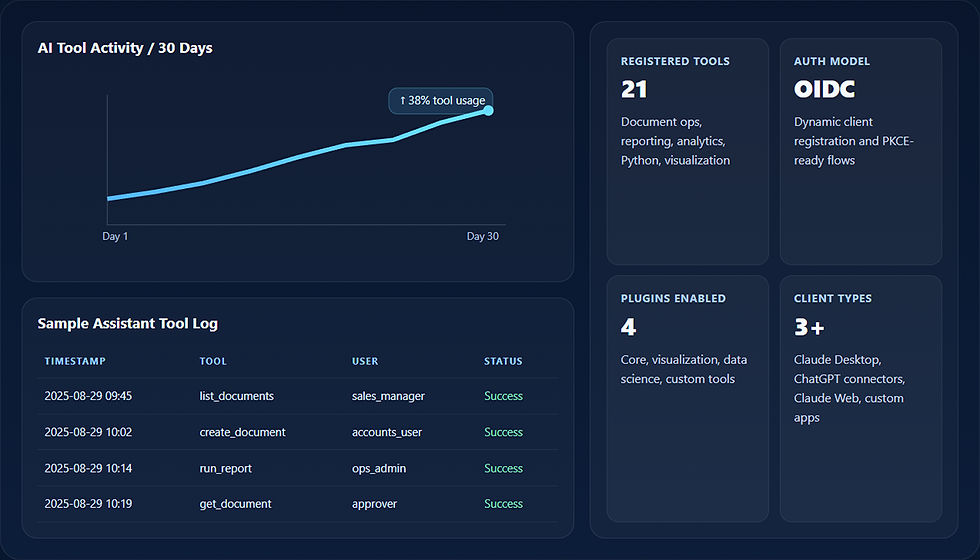
Embedded Dashboards + Workflow Visuals
Enterprise Storytelling Layer for Demos, Sales, and Product Pages
Security + Governance
AI That Can Be Trusted in Real ERP Environments
Frappe Assistant Core is designed around the enterprise realities that usually block AI adoption: authentication, permissions, audit logging, and tool governance. OAuth 2.0 and OpenID Connect flows are part of the product model. ERPNext permissions remain authoritative. Audit logs capture model interactions against business data. This turns experimentation into something deployable.
OAuth 2.0 / OIDC
Dynamic Client Registration, PKCE support, and standardized discovery endpoints.
ERPNext permissions integration
Existing roles and permissions govern what the assistant can actually do.
Audit trail
Every LLM interaction can be logged, reviewed, and traced for operational oversight.
Figma File Structure
Ready for Your Design Team
This page includes a companion Figma-ready structure document so your team can recreate the section as a proper design file with reusable components, page frames, and interactive states.
Page 1 — Cover / Product Positioning
-
Hero frame / dark gradient background / CTA states / badge set
-
Value card component / metric tile / quote block
Page 2 — Interactive Architecture
-
Layer tabs / active-inactive variants / node states / detail panel
-
Connector arrows / background stage / system labels
Page 3 — Workflow + Setup
-
5-step flow cards / code block component / prompt cards
Page 4 — Dashboards / Activity Panels
-
KPI cards / chart component / audit-log table / admin shell
Page 5 — Security / CTA
-
Security pillar cards / closing CTA / footer note / button variants
Build With Techunison
Ready to Turn ERPNext into an AI-Connected Operating Platform?
Frappe Assistant Core is the kind of architecture that moves AI from novelty to governed execution. For organizations building ERP copilots, departmental agents, or AI-driven operational platforms, this is the foundation that matters.